✦ Back to Homepage



Eliminating friction in client login management
I redesigned the user experience for a service that provides a quick and easy way to set up authentication and identity providers.
My Roles:
UX Research, UI Designer
Team:
PM, Solution Architects, Designer, and Engineering
Year:
2022

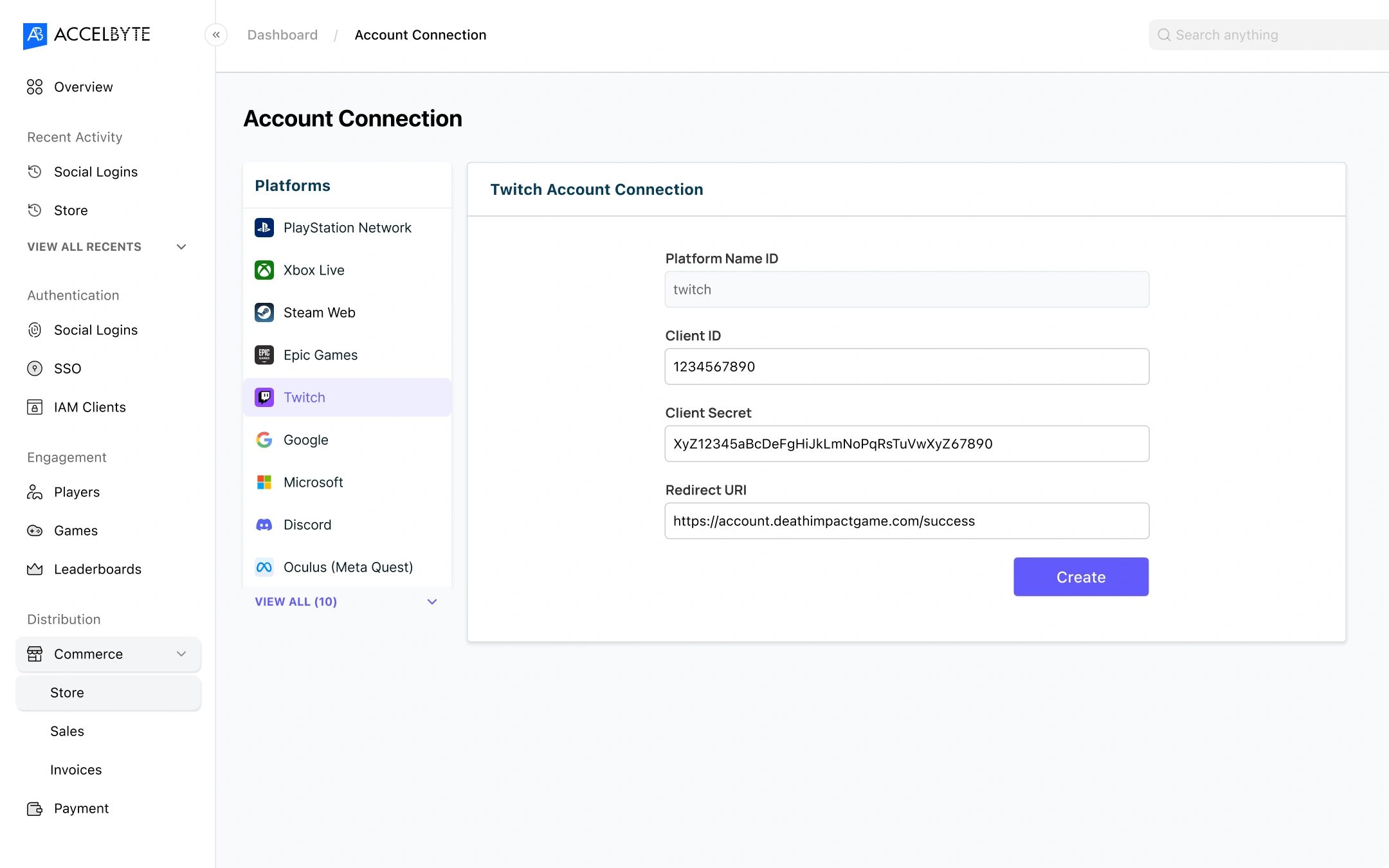
Before
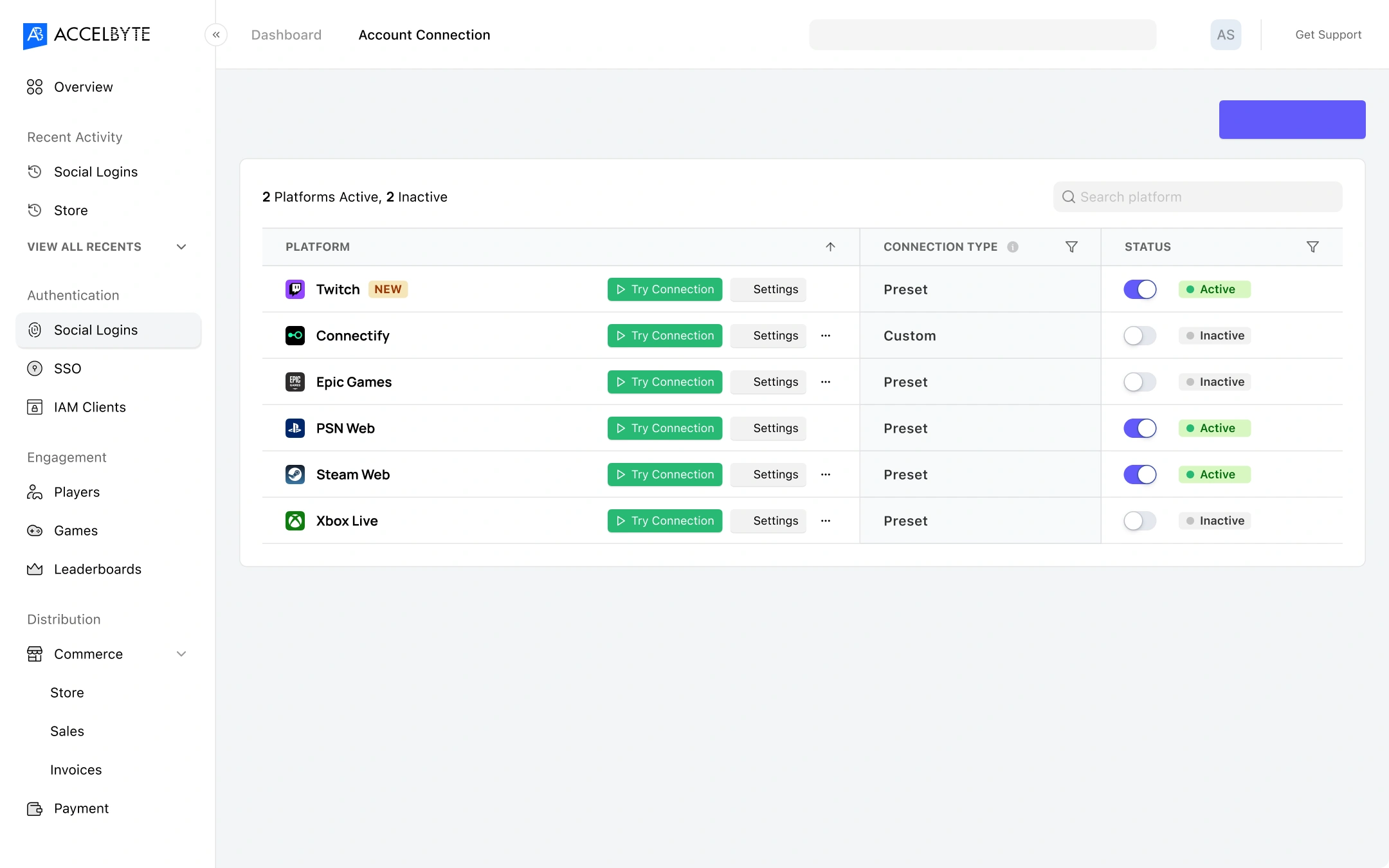
After
The problem
Customers churned because of the bad UX, even tough the technology is working great.
Lot’s of customers abandoned their setup and either called for our support, or use competitor’s services.
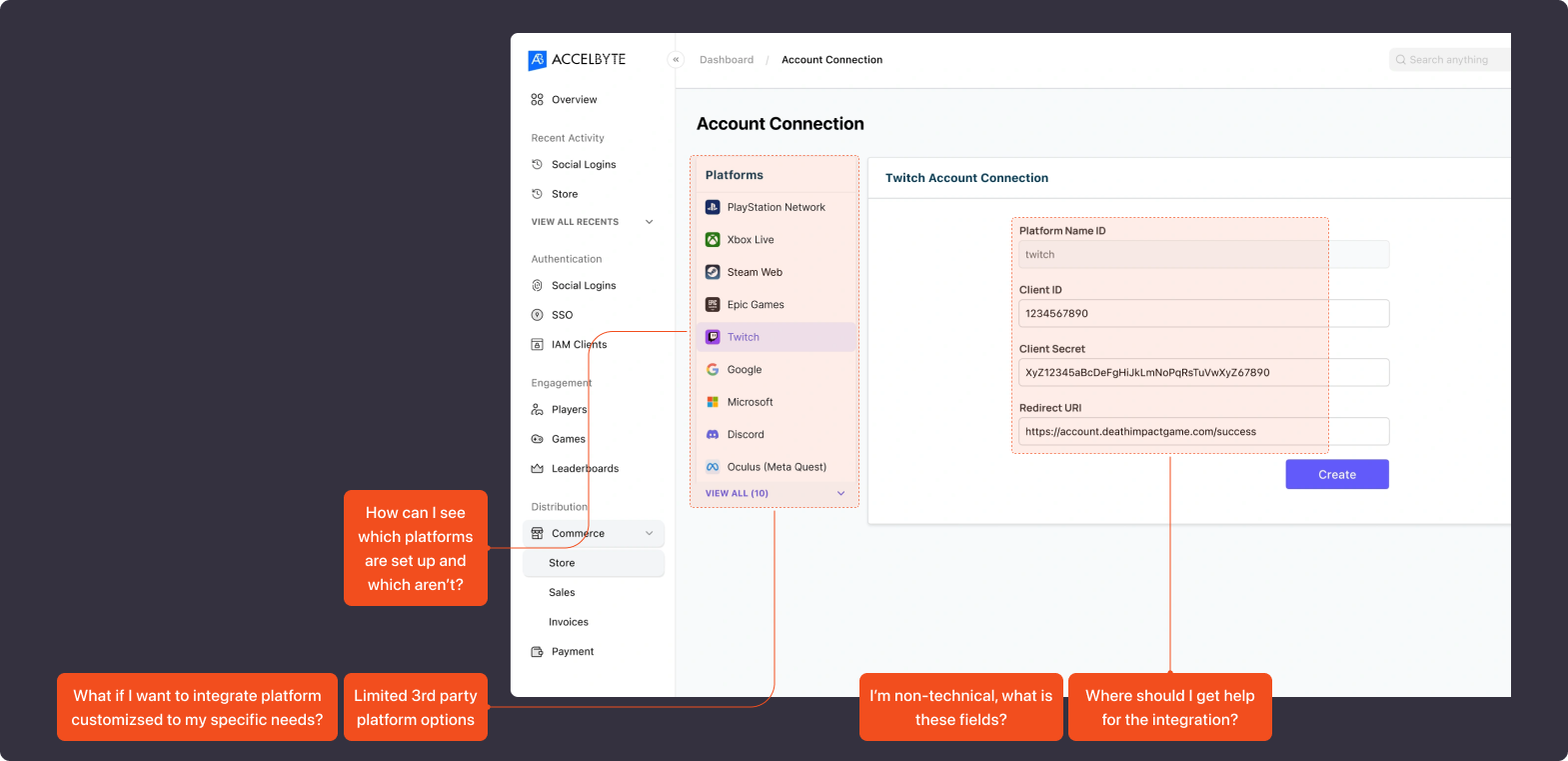
UX Research
See how other products with similar services, even though they aren’t direct competitors helps me to understand the user flow.
e.g., third-party authentication platforms identity providers

A robust identity provider platform for app authentication.
Google’s simple and flexible authentication service.

A leader in identity and access management for enterprises.
An AWS service for user sign-up and authentication.
A cloud-based identity management system.
And it narrowed-down to the 2 most relevant to our product’s framework.
Parameters:
- Similarity to our product (e.g., focus on B2B, custom platform integration).
- Their reputation for customer success.
Auth0 and Firebase fits the criteria. So, we proceed to compare their pros and cons that fits to our product’s need.
A robust identity provider platform for app authentication.
Pros:
- Highly customizable authentication flows.
- Extensive documentation and developer-friendly tools.
- Supports a wide range of platforms (OIDC, OAuth, SAML).
- Intuitive setup process with a clean, modern UI.
Cons:
- Can feel overwhelming for non-technical users.
Google’s simple and flexible authentication service.
Pros:
- Seamless integration with other Firebase services (e.g., Firestore, Hosting).
- Simplified setup process for developers with pre-built UI components.
Cons:
- Limited customization for authentication flows.
- More focused on smaller-scale projects than large enterprises.
Opportunities synthesized from the comparation analysis.
Highlights documentation and onboarding to enhance usability.
Simplify complex integration to appeal to a broader user.
Pre-built platforms options and custom platform integration to support wider use cases.
Highlight “quick and easy setup” for non-technical customers.
Ideation
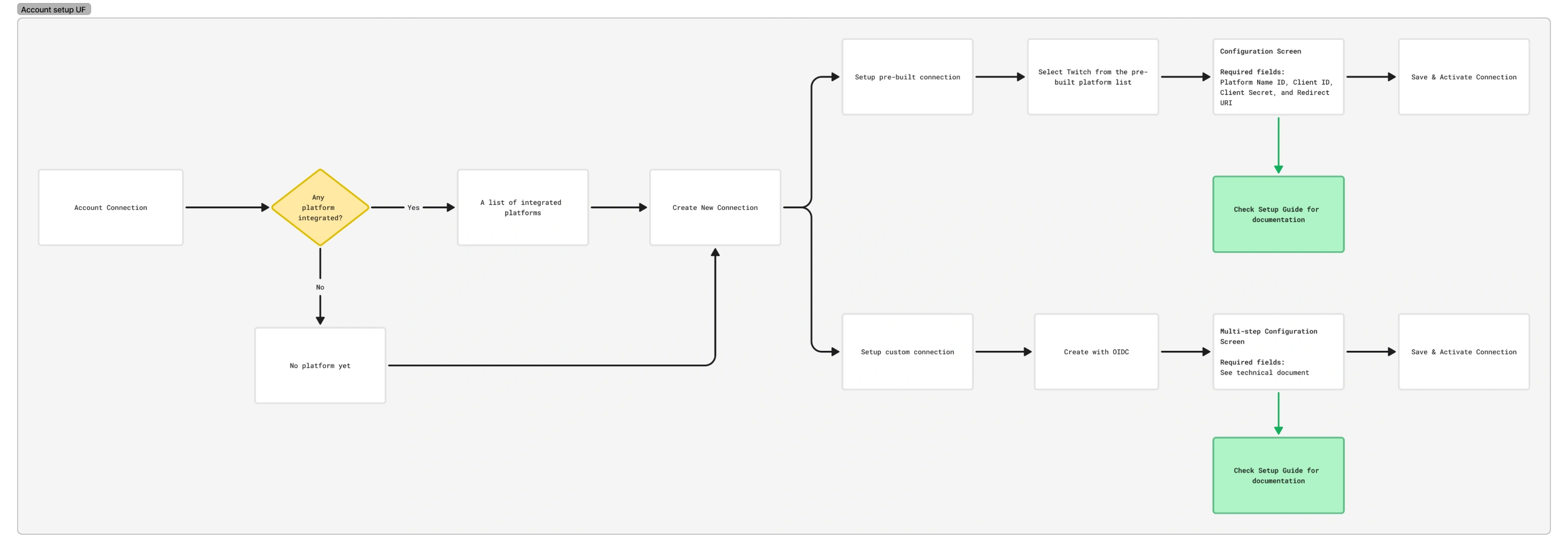
I create a simple user flow diagram for setting up an account connection process.
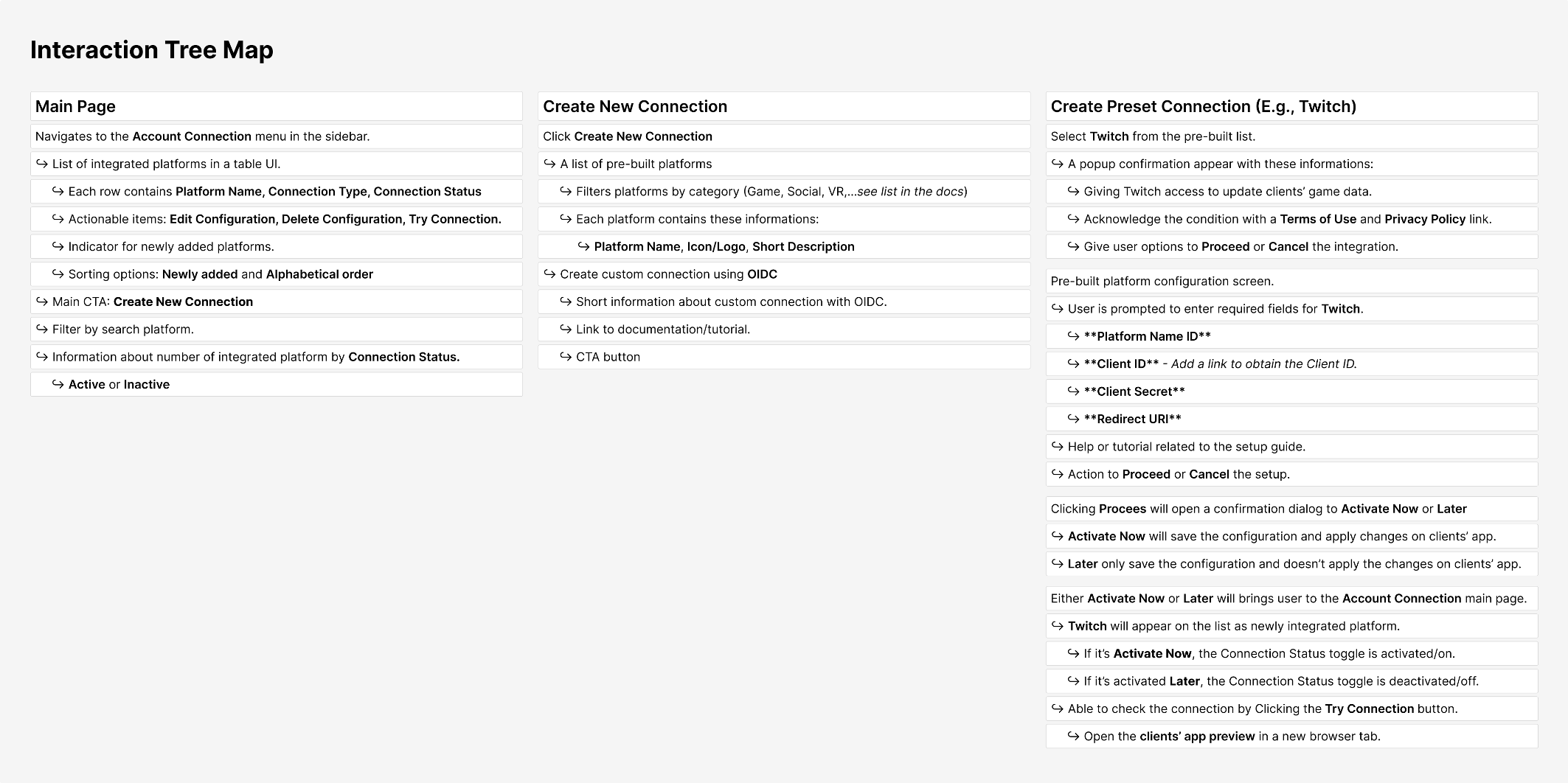
Then I translated the user flow into a more detailed interaction tree map.
Wireframing
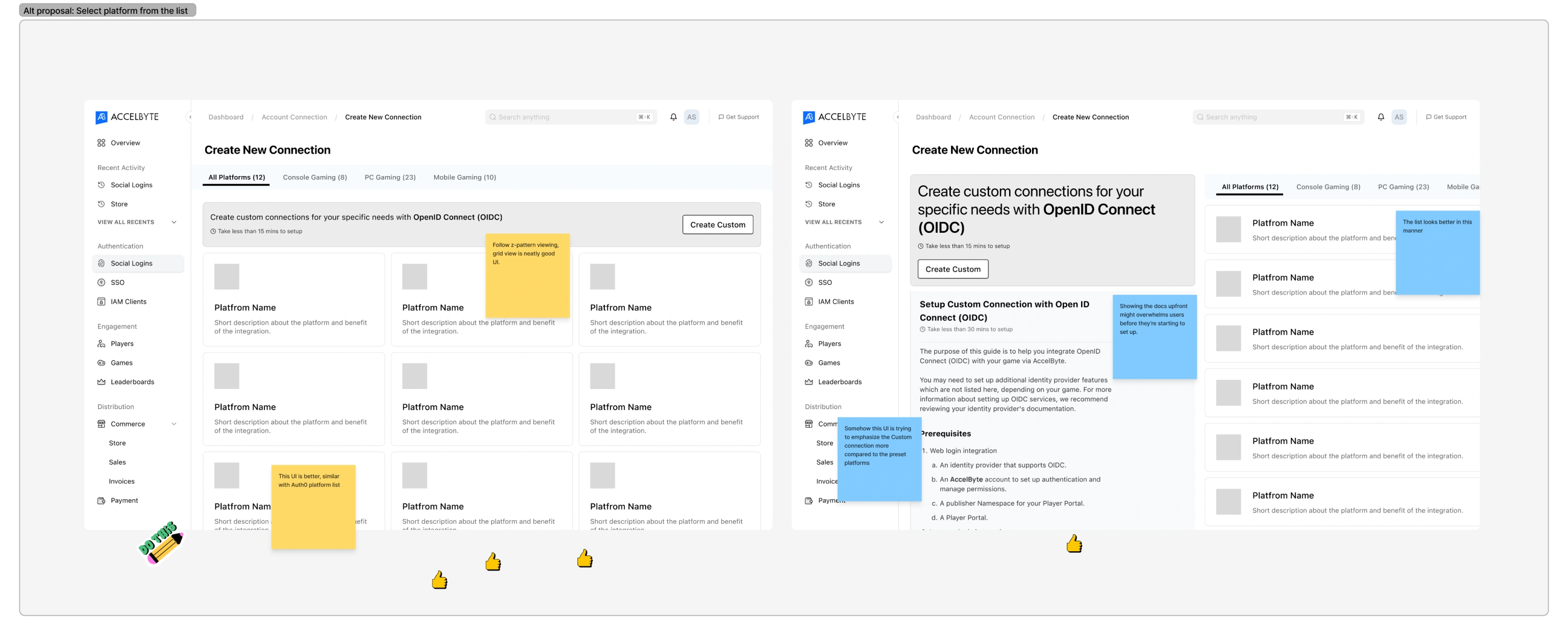
I created design options to explore and compare layout possibilities.
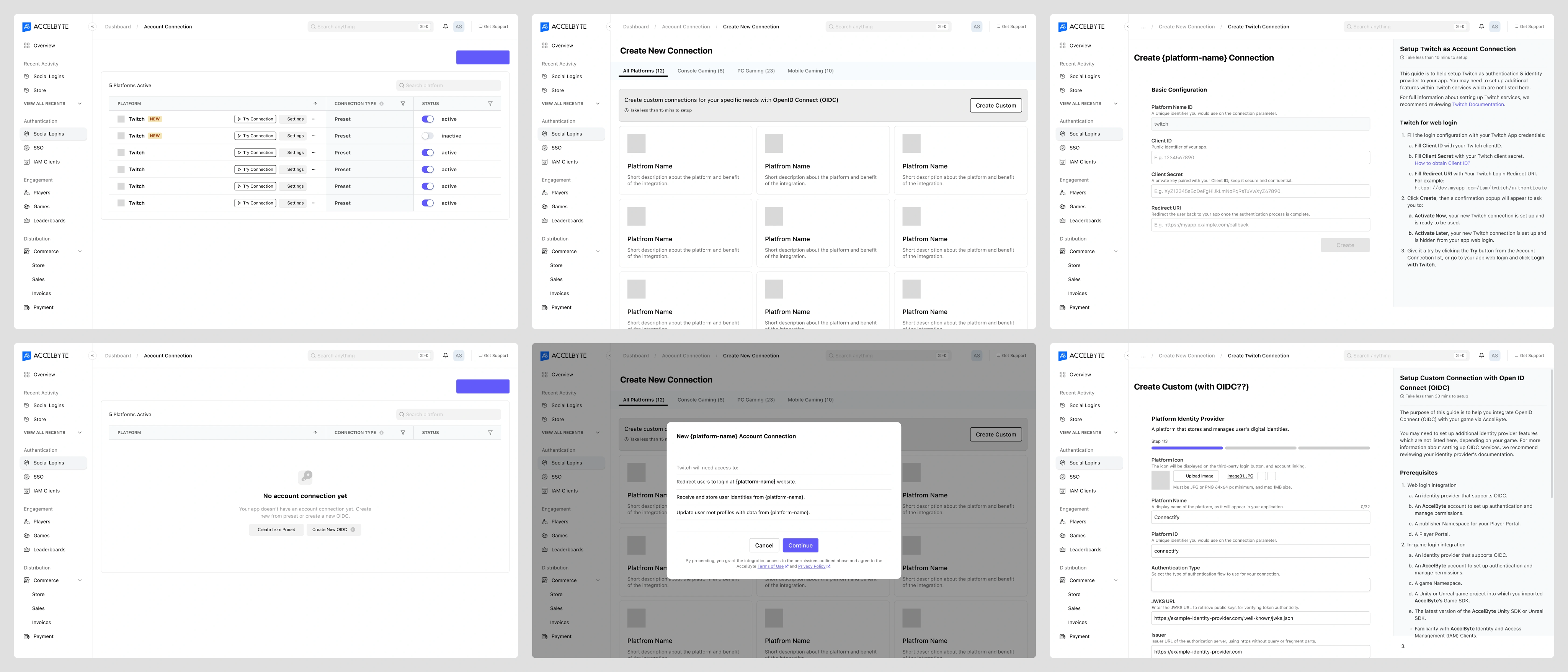
Then, I tested the navigation, copywriting, and functionality flow to the stakeholders through wireframes.
Final Design
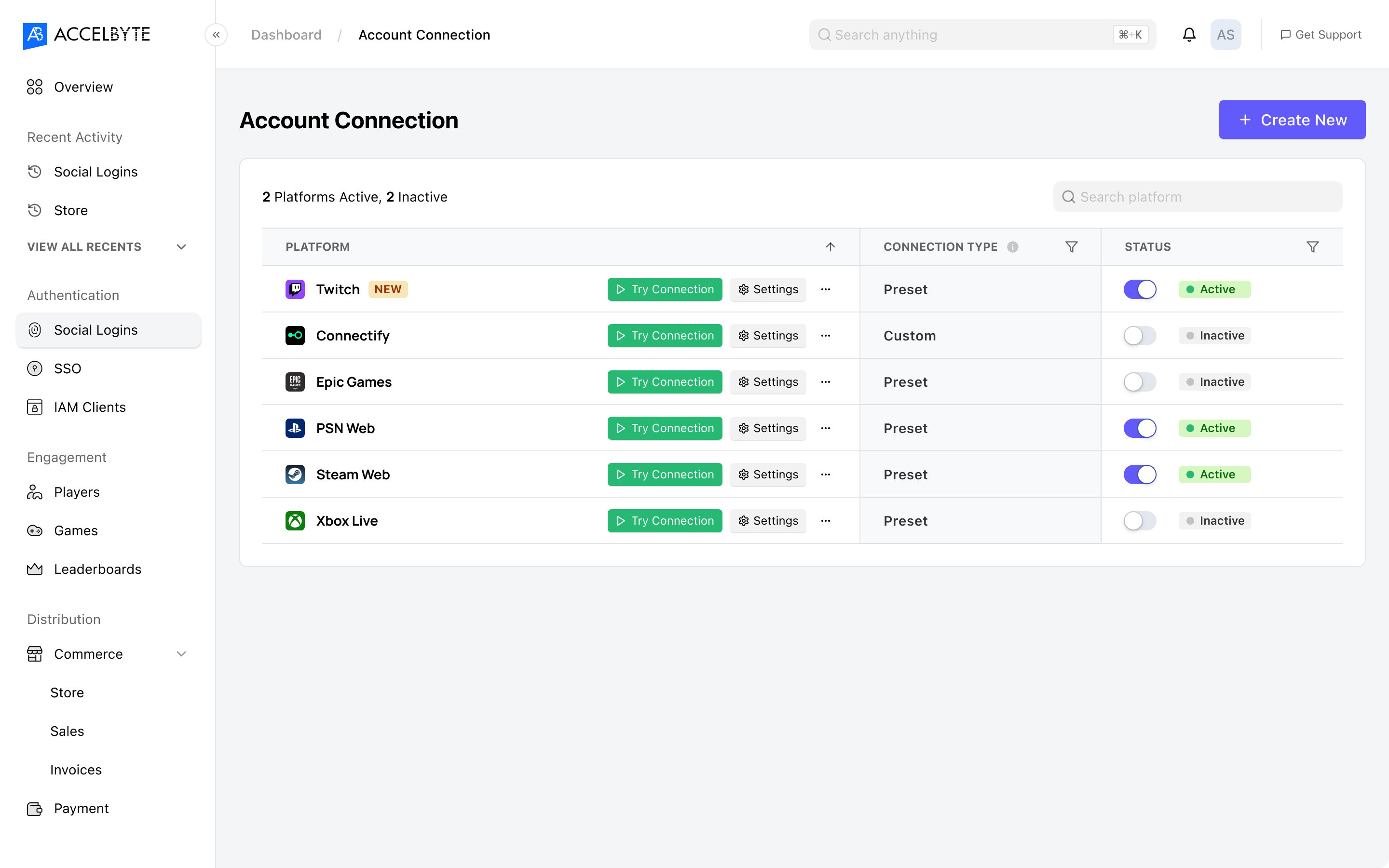
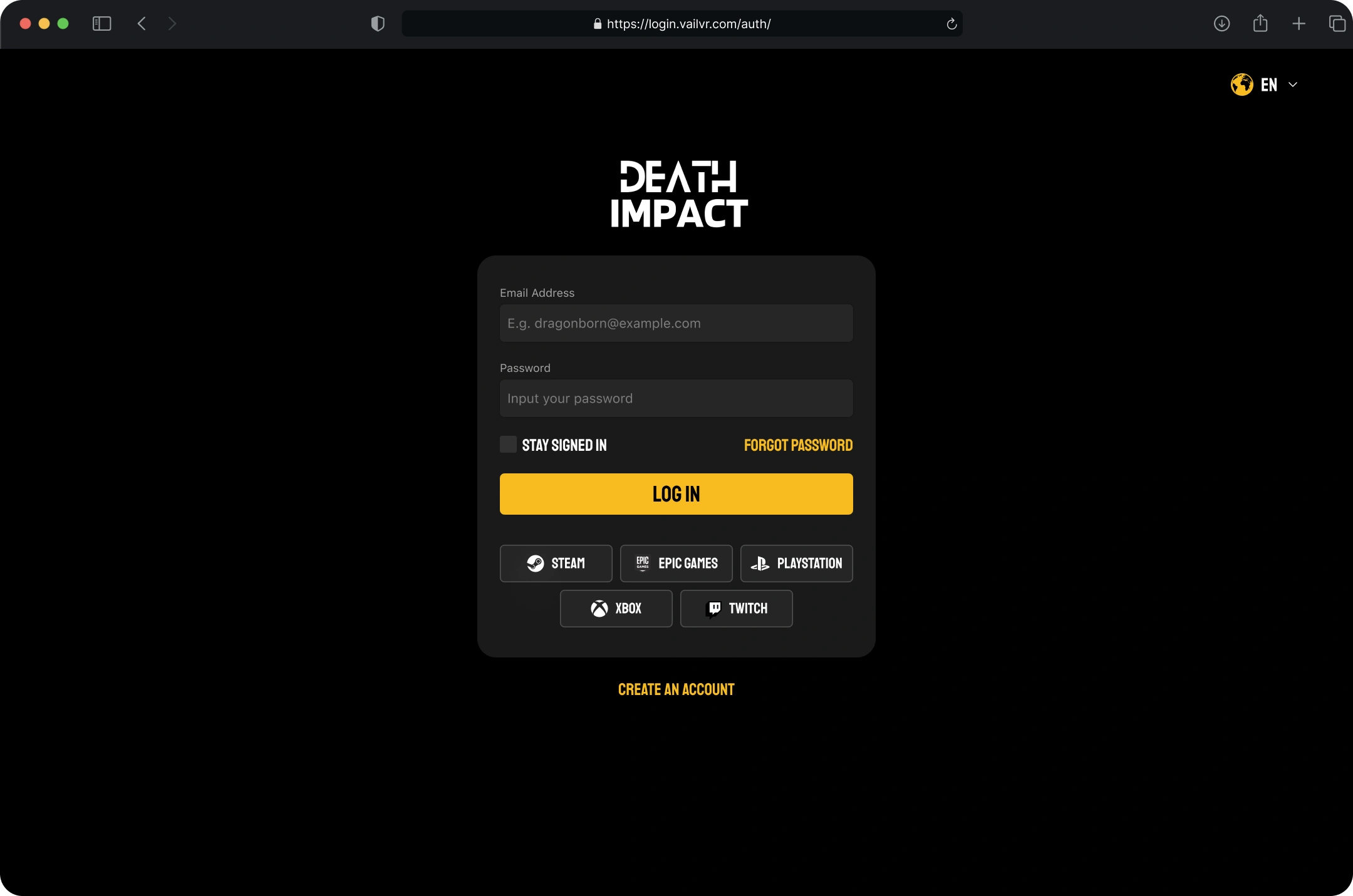
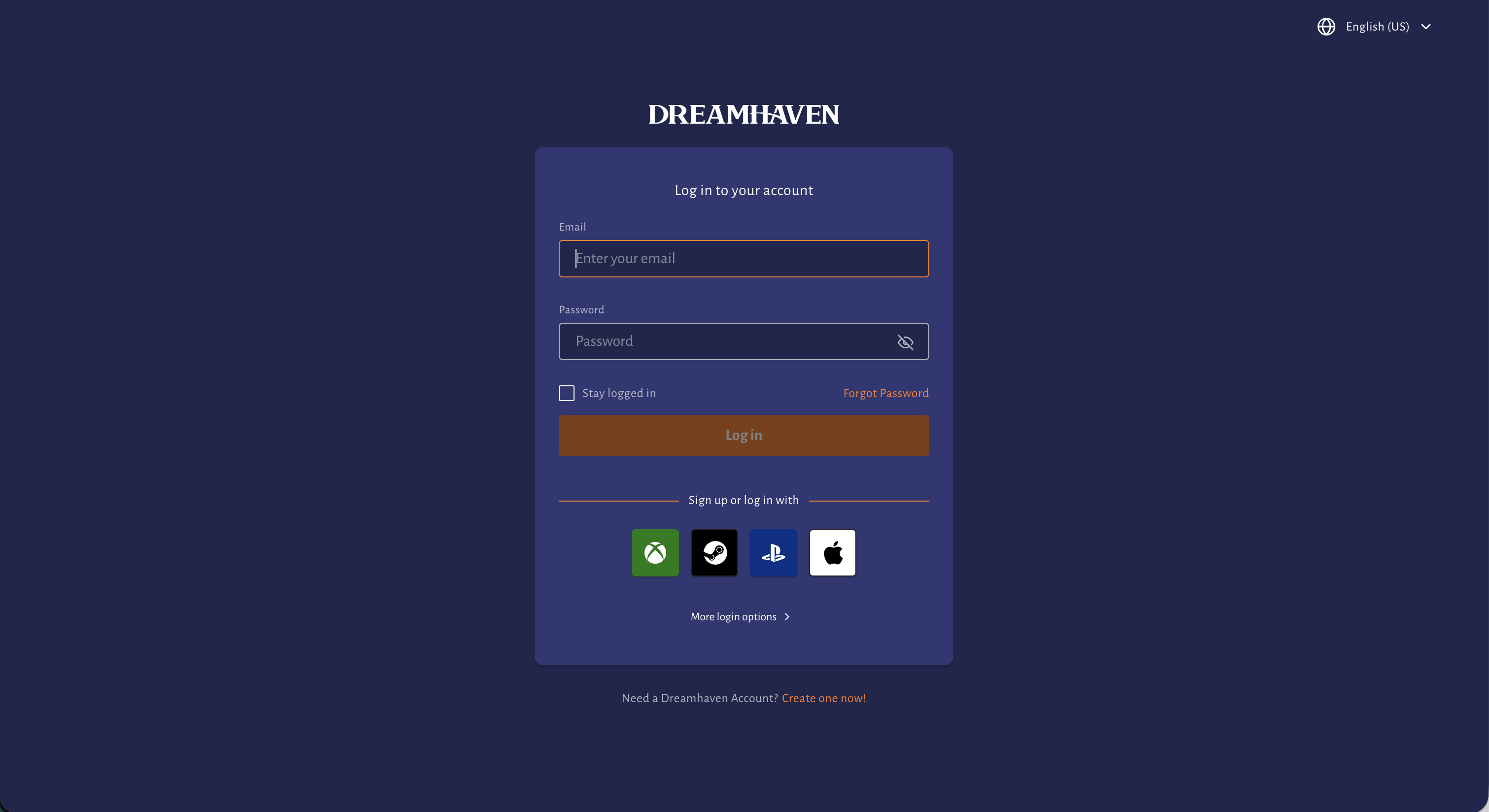
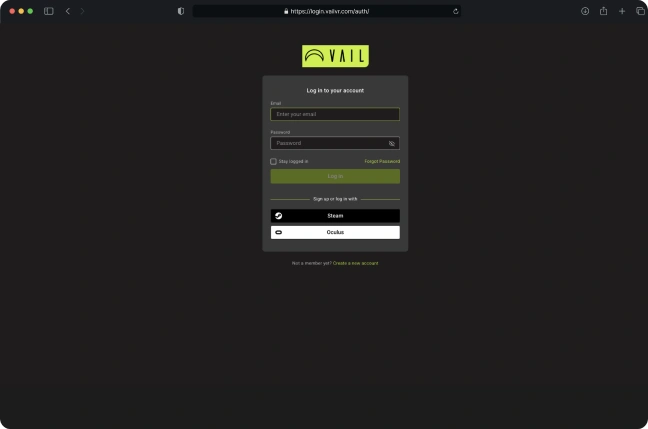
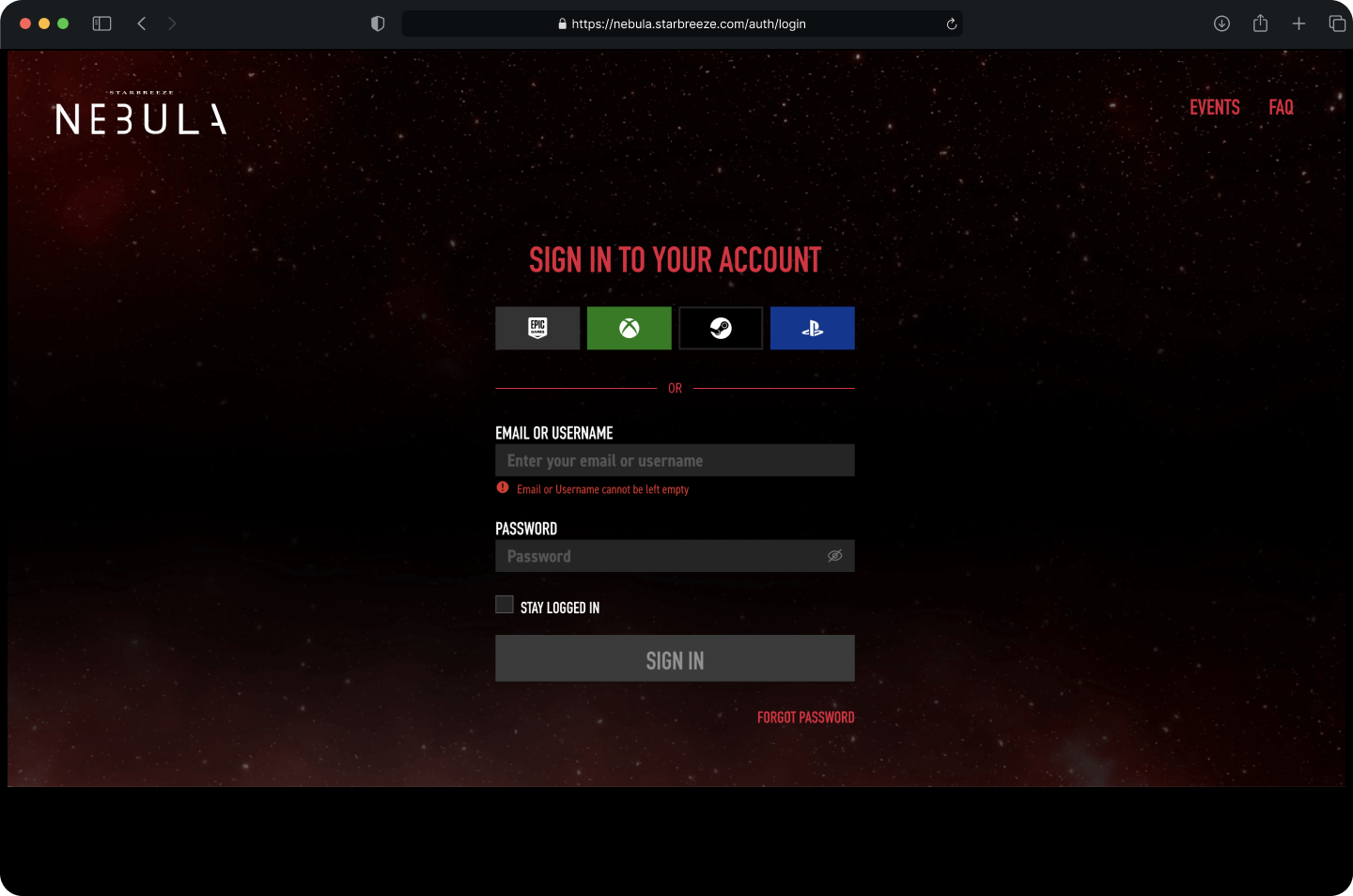
Introducing overview page to helps users access and manage connected platforms.
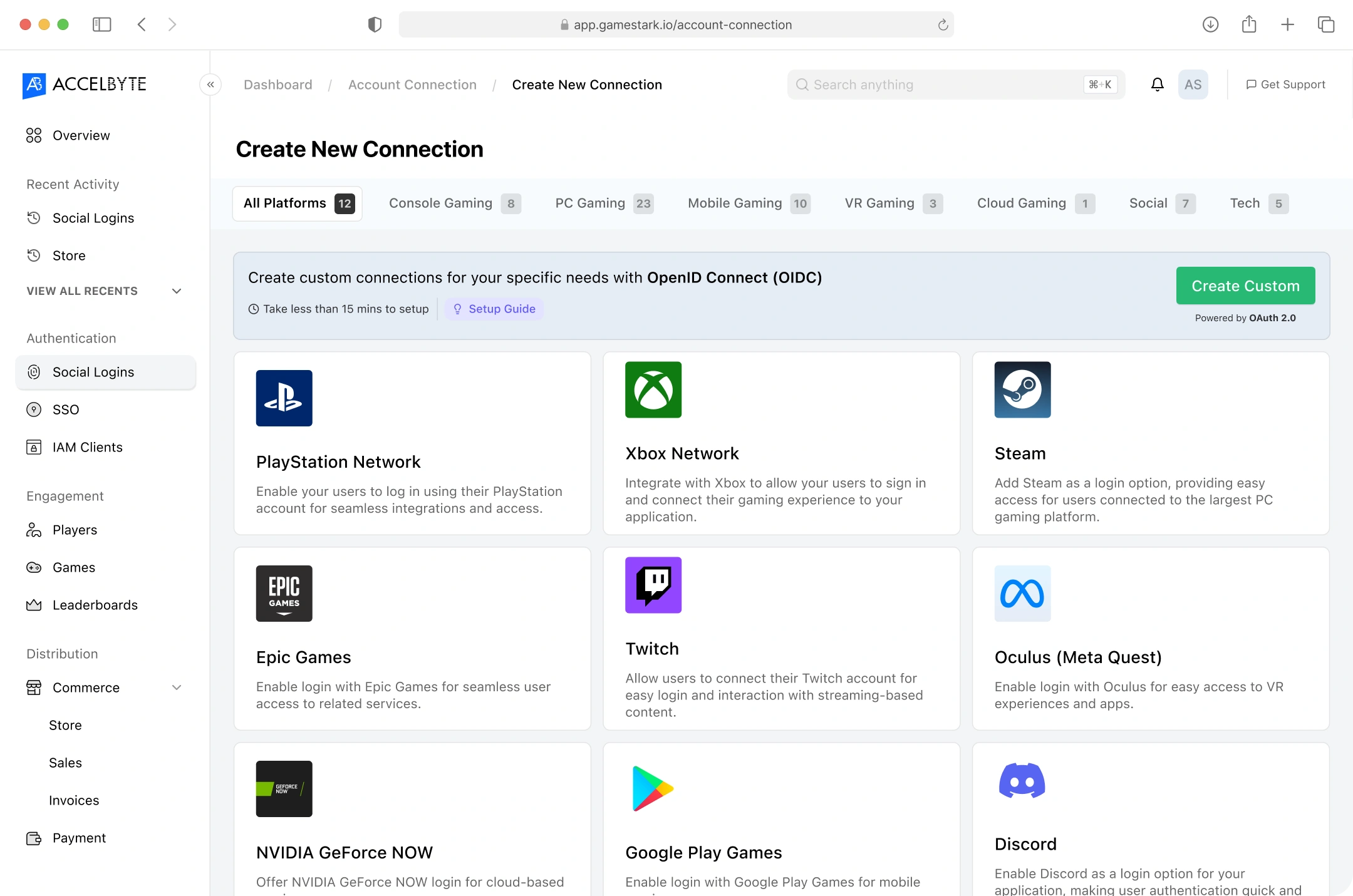
Display and categorize all platforms to set up with more context informations.
We’re also introducing custom connection method for enterprises and specific needs thanks to OIDC (OpenID Connect).
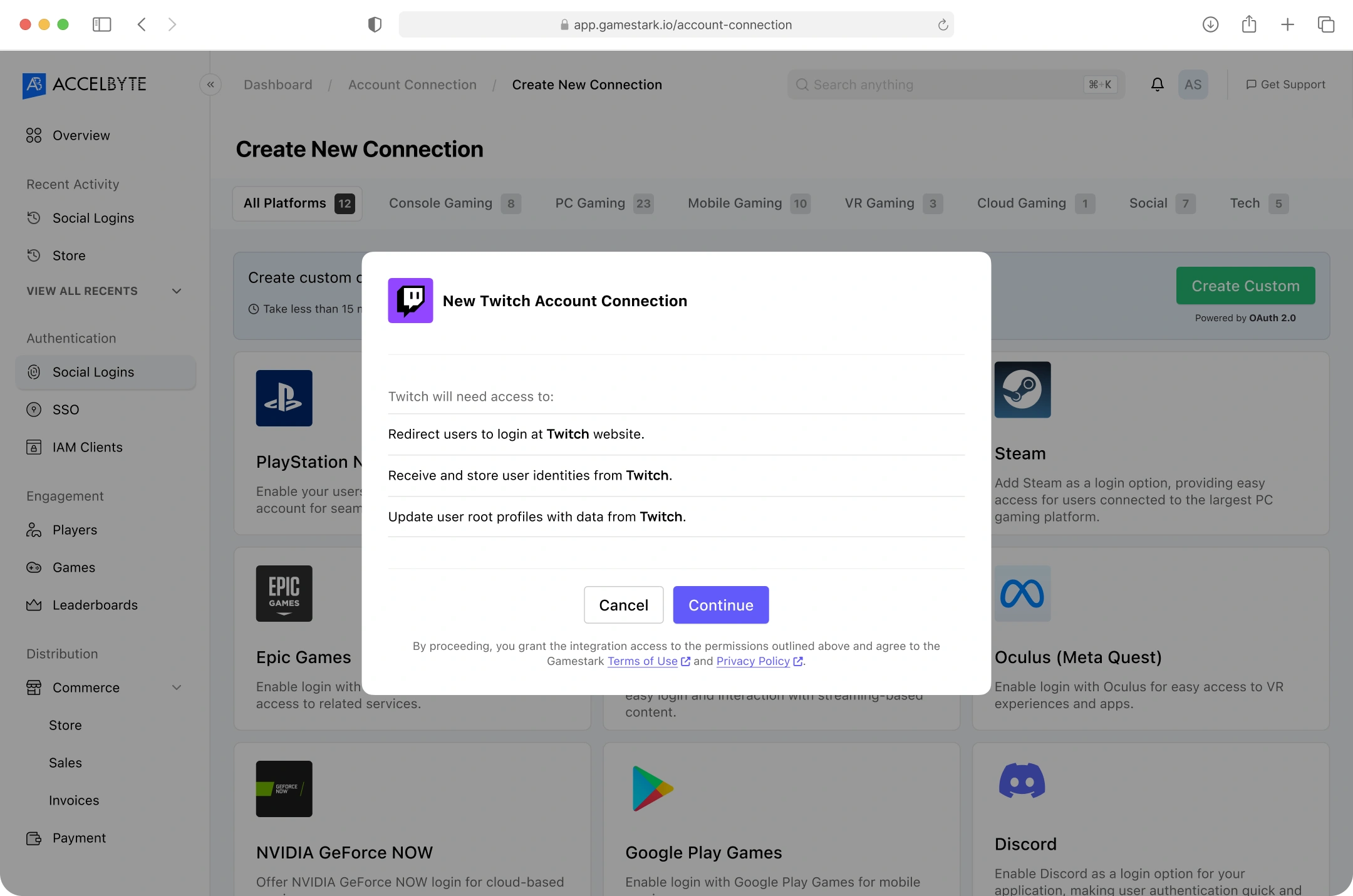
Add contextual help and tutorial accessible for non-technical users.
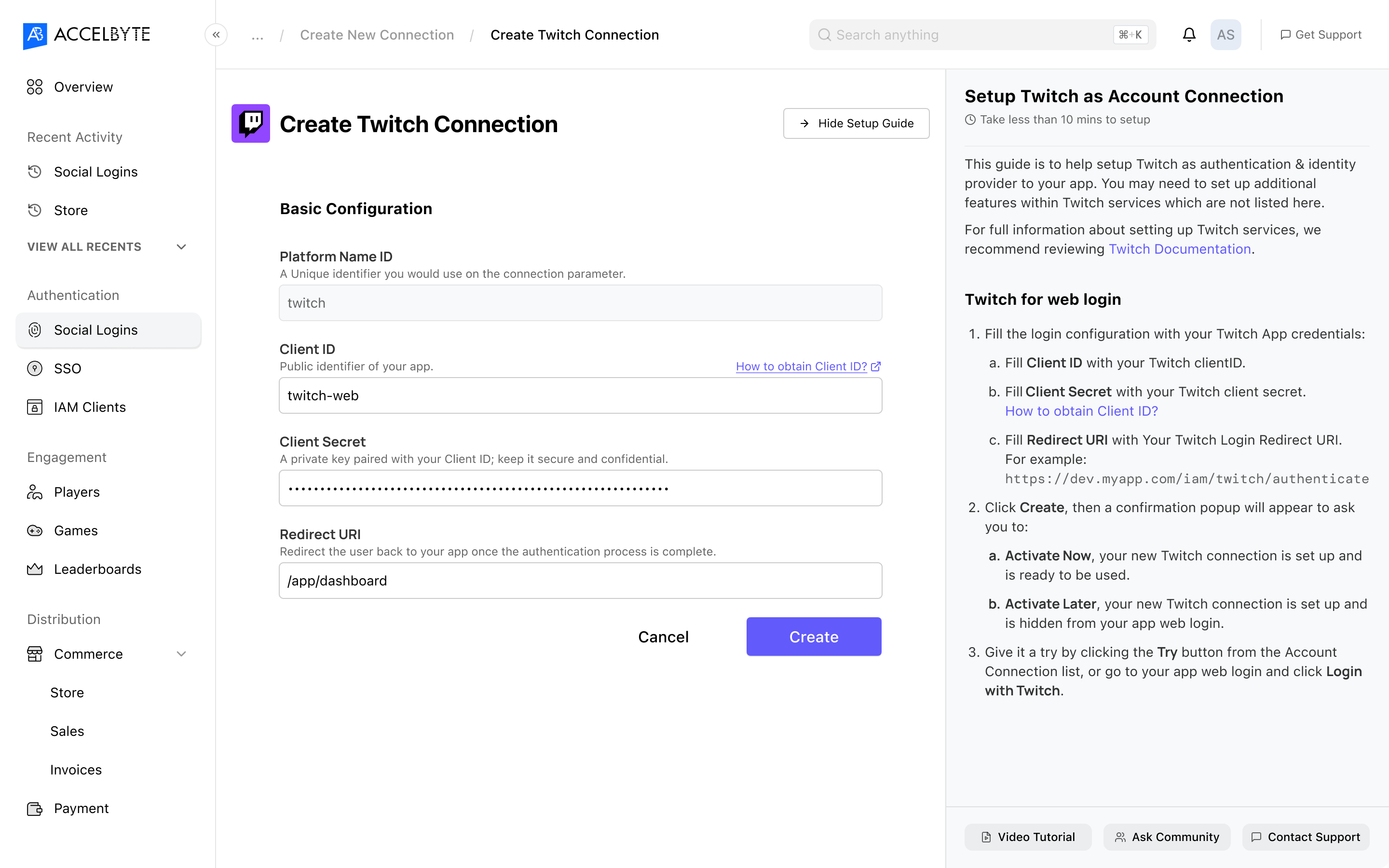
We also introducing the OIDC for custom connection as an advanced solution designed for enterprise-level and specific use cases.
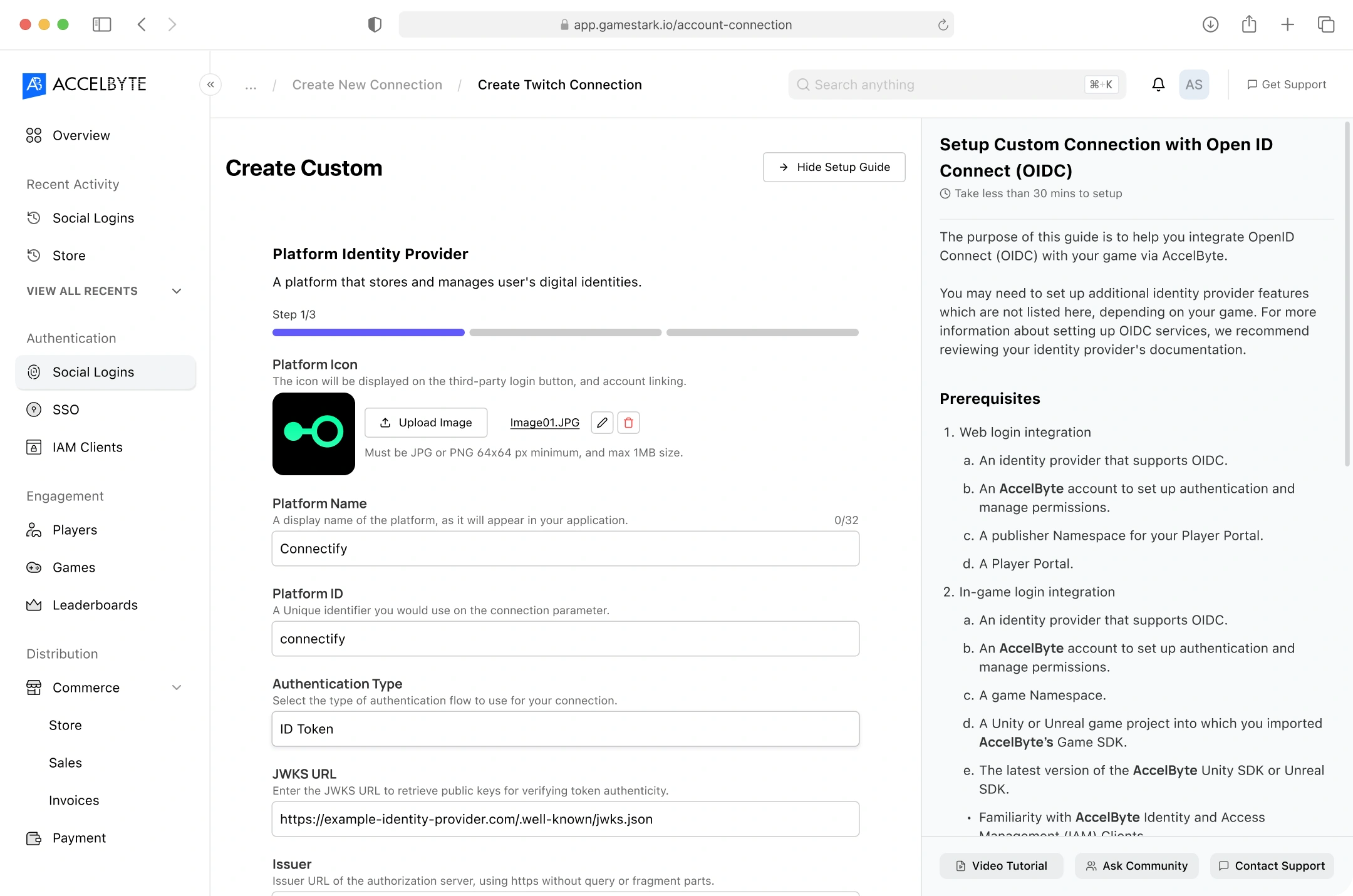
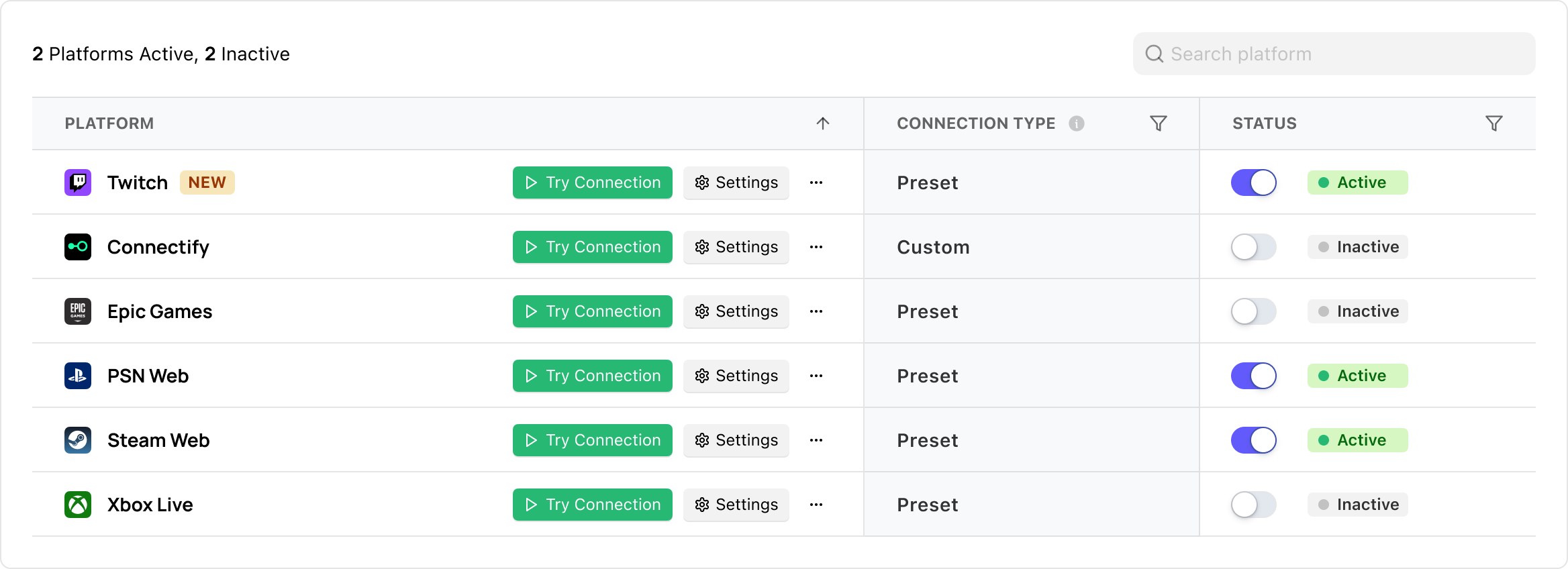
The activated platform will be displayed in the connected accounts list in overview page.
User can also test it in he demo environment right from the overview page.
Impact
We received encouraging feedback from our existing customers, and it helped reduce a lot of the back-and-forth, quick-fix support requests.
I’l be happy to walk you through the case study behind this project
I am available for an online conversation at your convenience to explore potential roles and how I can add value to your organization.


✦ Back to Homepage
Eliminating friction in client login management
I redesigned the user experience for a service that provides a quick and easy way to set up authentication and identity providers.
My Roles:
UX Research, UI Designer
Team:
PM, Solution Architects, Designer, and Engineering
Year:
2022
Before
After
The problem
Customers churned because of the bad UX, even tough the technology is working great.
Lot’s of customers abandoned their setup and either called for our support, or use competitor’s services.
UX Research
See how other products with similar services, even though they aren’t direct competitors helps me to understand the user flow.
e.g., third-party authentication platforms identity providers
A robust identity provider platform for app authentication.
Google’s simple and flexible authentication service.
A leader in identity and access management for enterprises.
An AWS service for user sign-up and authentication.
A cloud-based identity management system.
And it narrowed-down to the 2 most relevant to our product’s framework.
Parameters:
- Similarity to our product (e.g., focus on B2B, custom platform integration).
- Their reputation for customer success.
Auth0 and Firebase fits the criteria. So, we proceed to compare their pros and cons that fits to our product’s need.
A robust identity provider platform for app authentication.
Pros:
- Highly customizable authentication flows.
- Extensive documentation and developer-friendly tools.
- Supports a wide range of platforms (OIDC, OAuth, SAML).
- Intuitive setup process with a clean, modern UI.
Cons:
- Can feel overwhelming for non-technical users.
Google’s simple and flexible authentication service.
Pros:
- Seamless integration with other Firebase services (e.g., Firestore, Hosting).
- Simplified setup process for developers with pre-built UI components.
Cons:
- Limited customization for authentication flows.
- More focused on smaller-scale projects than large enterprises.
Opportunities synthesized from the comparation analysis.
Highlights documentation and onboarding to enhance usability.
Simplify complex integration to appeal to a broader user.
Pre-built platforms options and custom platform integration to support wider use cases.
Highlight “quick and easy setup” for non-technical customers.
Ideation
I create a simple user flow diagram for setting up an account connection process.
Then I translated the user flow into a more detailed interaction tree map.
Wireframing
I created design options to explore and compare layout possibilities.
Then, I tested the navigation, copywriting, and functionality flow to the stakeholders through wireframes.
Final Design
Introducing overview page to helps users access and manage connected platforms.
Display and categorize all platforms to set up with more context informations.
We’re also introducing custom connection method for enterprises and specific needs thanks to OIDC (OpenID Connect).
Add contextual help and tutorial accessible for non-technical users.
We also introducing the OIDC for custom connection as an advanced solution designed for enterprise-level and specific use cases.
The activated platform will be displayed in the connected accounts list in overview page.
User can also test it in he demo environment right from the overview page.
Impact
We received encouraging feedback from our existing customers, and it helped reduce a lot of the back-and-forth, quick-fix support requests.
I’l be happy to walk you through the case study behind this project
I am available for an online conversation at your convenience to explore potential roles and how I can add value to your organization.
✦ Back to Homepage
Eliminating friction in client login management
I redesigned the user experience for a service that provides a quick and easy way to set up authentication and identity providers.
My Roles:
UX Research, UI Designer
Team:
PM, Solution Architects, Designer, and Engineering
Year:
2022
Before
After
The problem
Customers churned because of the bad UX, even tough the technology is working great.
Lot’s of customers abandoned their setup and either called for our support, or use competitor’s services.
UX Research
See how other products with similar services, even though they aren’t direct competitors helps me to understand the user flow.
e.g., third-party authentication platforms identity providers
A robust identity provider platform for app authentication.
Google’s simple and flexible authentication service.
A leader in identity and access management for enterprises.
An AWS service for user sign-up and authentication.
A cloud-based identity management system.
And it narrowed-down to the 2 most relevant to our product’s framework.
Parameters:
- Similarity to our product (e.g., focus on B2B, custom platform integration).
- Their reputation for customer success.
Auth0 and Firebase fits the criteria. So, we proceed to compare their pros and cons that fits to our product’s need.
A robust identity provider platform for app authentication.
Pros:
- Highly customizable authentication flows.
- Extensive documentation and developer-friendly tools.
- Supports a wide range of platforms (OIDC, OAuth, SAML).
- Intuitive setup process with a clean, modern UI.
Cons:
- Can feel overwhelming for non-technical users.
Google’s simple and flexible authentication service.
Pros:
- Seamless integration with other Firebase services (e.g., Firestore, Hosting).
- Simplified setup process for developers with pre-built UI components.
Cons:
- Limited customization for authentication flows.
- More focused on smaller-scale projects than large enterprises.
Opportunities synthesized from the comparation analysis.
Highlights documentation and onboarding to enhance usability.
Simplify complex integration to appeal to a broader user.
Pre-built platforms options and custom platform integration to support wider use cases.
Highlight “quick and easy setup” for non-technical customers.
Ideation
I create a simple user flow diagram for setting up an account connection process.
Then I translated the user flow into a more detailed interaction tree map.
Wireframing
I created design options to explore and compare layout possibilities.
Then, I tested the navigation, copywriting, and functionality flow to the stakeholders through wireframes.
Final Design
Introducing overview page to helps users access and manage connected platforms.
Display and categorize all platforms to set up with more context informations.
We’re also introducing custom connection method for enterprises and specific needs thanks to OIDC (OpenID Connect).
Add contextual help and tutorial accessible for non-technical users.
We also introducing the OIDC for custom connection as an advanced solution designed for enterprise-level and specific use cases.
The activated platform will be displayed in the connected accounts list in overview page.
User can also test it in he demo environment right from the overview page.
Impact
We received encouraging feedback from our existing customers, and it helped reduce a lot of the back-and-forth, quick-fix support requests.
I’l be happy to walk you through the case study behind this project
I am available for an online conversation at your convenience to explore potential roles and how I can add value to your organization.